I recently made yet another change to my blog design! My blog went from this:

To this:

I just wanted something a little more simple and easy on the eyes
since my header is already a little crazy! :)
So do you want to know how to add a border to your blog?
It doesn't have to be solid, you can do a double border like
I have on my blog design business or dotted or even dashed.
First go to Design>Edit HTML

Hit Command + F (for Mac users like myself) or Control + F (for PC Users)
then find this section of your HTML: .content-outer
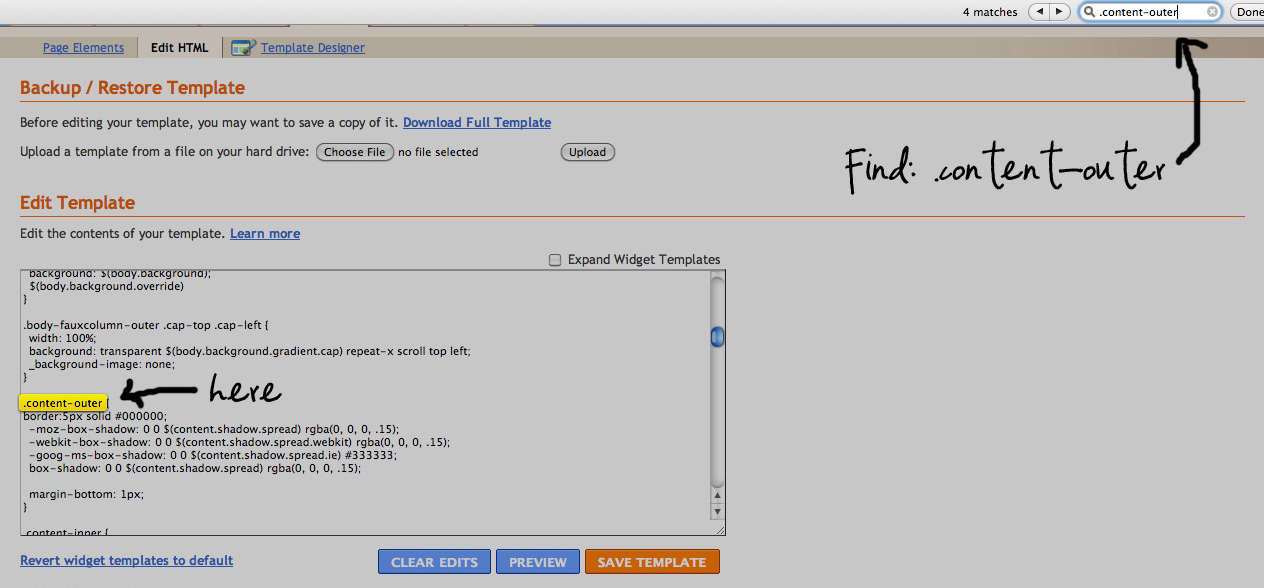
Paste this code underneath:
border: 5px solid #ffffff;
Change Size of Border: replace the 5 for a different number
Change Border Style: replace solid for any of these: dotted, dashed, double
Change Color: replace the #ffffff to any color code to match
You can find a color code in this website
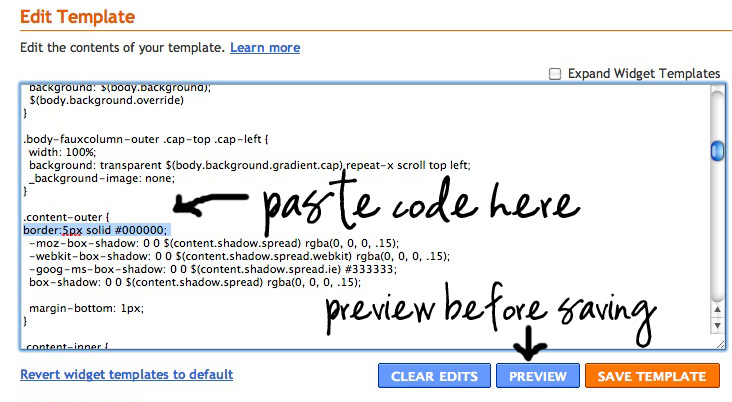
Make sure to preview before saving your template!
Once you are happy with your look go ahead and save.
Let me know if you try this, I would love to see how it looks on your blog! :)
From time to time I will be posting blogging tips here on my blog.
I am still learning and love to share what I learn with you all.
Have a Great Day!
<3 Cindy
Linking up to these parties HERE